
 By Bradley Field, founder of FieldSoft7 min read · Updated 1 November 2026
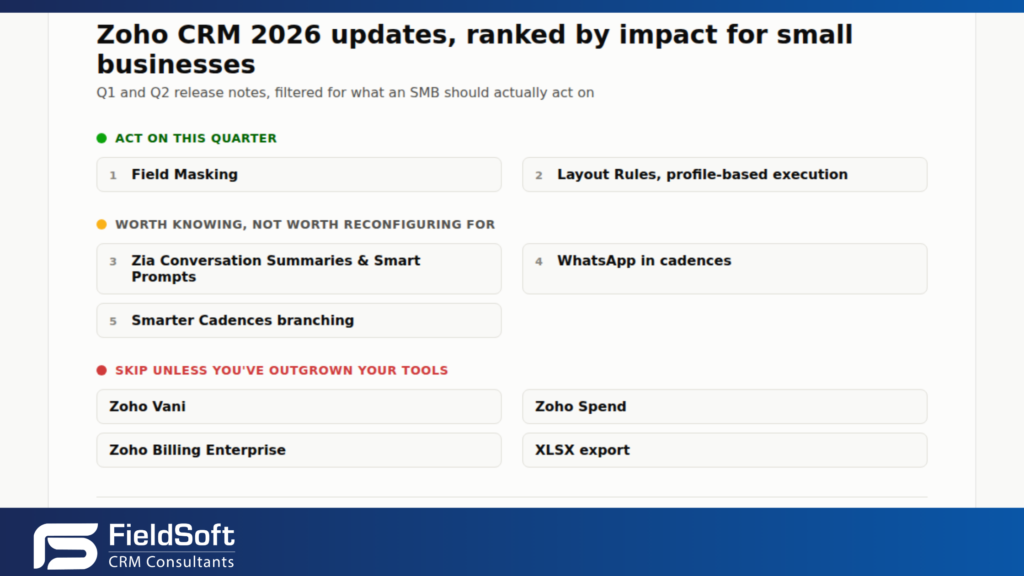
Zoho pushed dozens of changes through the Q1 and Q2 2026 release notes. Most small businesses running Zoho CRM don’t have a spare afternoon to read them. This is a filtered read of the Zoho CRM 2026 updates that change how you actually work, ranked by impact rather than release date. We’re also telling you what to skip, because a chunk of every Zoho CRM Q1 Q2 2026 release notes post is marketing padding dressed up as news.
If you’d rather have someone map this against your own setup, that’s exactly the filter FieldSoft runs for clients through our Zoho CRM consultancy and implementation work.
Key takeaways
- Field Masking lets admins hide sensitive fields fully or partly, and the masking holds across exports, reports, integrations and API responses.
- Layout Rules now run by profile, so the same record can show different fields to a sales user and a finance user.
- Zia summaries and Smart Prompts draft and suggest, but a person still checks and sends before anything goes out.
- WhatsApp is now a cadence channel, and cadences can branch on call outcomes and email signals.
- Zoho Vani, Zoho Spend, Zoho Billing Enterprise and XLSX export can be skipped by most small businesses.
What does Zoho CRM Field Masking do?
Say a sales user pulls up a customer record to check an order. They don’t need the full card number on file, or the date of birth stored for identity checks. Until this release, they saw the whole field or none of it. Field Masking gives admins two options: full masking, which hides the value completely, or custom masking, which shows a slice, such as the last four digits of a phone number. An authorised user clicks an eye icon to reveal the full value when needed, and that action is logged.
The masking holds across exports, reports, templates, integrations, API responses, and shared views. A masked field that only hides in the main record view and leaks out through a CSV export is security theatre.
It’s not finished everywhere yet. Zoho hasn’t rolled masking into certain email views, signal notifications, Zia features, or the mobile app, so don’t treat it as a complete data control until those gaps close. At the time of writing it’s rolling out to partners first, with customer access following. If you handle card details, ID numbers, or health data anywhere in your CRM, put this on your list now.
Zoho CRM Layout Rules: what changed with profile-based execution
Layout Rules got nine new actions: show or hide picklist values, set fields read-only, auto-set field values, recommend field values, show contextual messages, show or hide related lists, show or hide buttons, show or hide links, and verify fields. Useful on their own.
The headline is profile-based execution. The same record can now behave differently depending on who’s looking at it. A sales user opens a deal and sees a simplified layout with the fields they need to fill in. A finance user opens the same record and sees pricing and margin fields the sales user never had access to. Before this, getting that behaviour meant custom scripting, duplicate layouts, or accepting that everyone sees everything.
Zoho added an Interactive Preview so admins can test a rule against different profiles before switching it on, rather than finding out it broke someone’s view after go-live. If your team has more than two or three roles working the same modules, this is the update worth booking time for.
Zia Conversation Summaries and Smart Prompts: is Zoho’s AI doing the work yet?
Zia now summarises a customer conversation so a sales user can catch up without scrolling through the full history. Smart Prompts extend into email composition and formula building, where you describe what you want in plain language and get a formula back to check rather than write from scratch. Zoho also opened up LLM choice, so you can run Gemini, Claude, or Cohere behind these features instead of Zia’s native model.
Here’s the honest part. This is decent autosummarising and decent suggestion tooling. It reads, it drafts, it proposes, and a person still checks and sends before anything goes out. If you’re expecting Zia to chase a lead or update a record on its own, that’s not what shipped this quarter. Zoho is edging toward agentic AI in the CRM. It hasn’t arrived yet. Use it, but don’t tell your team it replaces anyone’s job.
WhatsApp in Zoho CRM cadences: why should UK SMBs use it?
Zoho added WhatsApp as a channel inside cadence sequences, alongside email and calls. Most write-ups mention it in a single line and move on. It deserves more than that for a UK audience.
Email open rates for cold or lukewarm B2B outreach sit low, often under 20%. WhatsApp messages get opened far more often, usually within minutes, because people check WhatsApp like a text message. A cluttered inbox gets far less attention. For trades, home services, and any business where the customer is on their phone rather than at a desk, that gap is the difference between a follow-up that gets seen and one that sits unread. Add a WhatsApp step into your cadence after the second unanswered email. Corporate procurement teams won’t message suppliers on WhatsApp, but consumer-facing SMBs are underusing it.
Zoho CRM Smarter Cadences: branching on call outcomes and email signals
Paired with WhatsApp, this is the other follow-up automation update worth knowing. Cadence steps can now branch based on call outcome and call duration, and on email signals: not opened, not replied, not clicked, and opened but not replied. Instead of one fixed sequence for every lead, the next step adjusts to what the lead actually did.
Combine this with the WhatsApp channel and you get a cadence that emails first, checks whether it was opened, and switches to WhatsApp if it wasn’t. That’s a rebuild worth doing if your current cadences are still one-size-fits-all.
What to skip in the Zoho CRM 2026 updates
| Update | What it is | Who it matters to |
|---|---|---|
| Zoho Vani | A flowchart and infinite canvas tool, positioned against Miro and Lucidchart | Only teams already shopping for a diagramming tool |
| Zoho Spend | A procurement platform for managing purchasing | Only businesses that have outgrown their current purchase process |
| Zoho Billing Enterprise | An upgraded tier of Zoho Billing (formerly Subscriptions) | Only teams already on Zoho Billing and hitting its ceiling |
| XLSX export | A convenience fix | Nice to have. Leave it out of your rollout plan |
Verdict
This is a quarter worth sitting down for, but only for two things. Field Masking if you hold any sensitive customer data, and Layout Rules if more than one type of user works the same records. Book an hour, test both in a sandbox, and roll out what applies. That’s the whole read on the Zoho CRM 2026 updates worth your time this quarter.
Everything else, including the AI updates, is worth knowing about and not worth reconfiguring anything for. Read the six updates above, ignore the rest of the release notes, and get back to running your business.
FAQs
It lets admins hide a field completely or show only a slice, such as the last four digits of a phone number. Authorised users can reveal the full value, and that action is logged.
Yes. Masking holds across exports, reports, templates, integrations, API responses and shared views. It is not yet in certain email views, signal notifications, Zia features or the mobile app.
The same record can now behave differently depending on the profile of the person looking at it. An Interactive Preview lets admins test a rule against different profiles before switching it on.
Yes. WhatsApp is now a channel inside cadence sequences alongside email and calls, and steps can branch on call outcomes and email signals.
Not yet. Zia summarises, drafts and proposes, and a person still checks and sends before anything goes out.
Set up Field Masking and Layout Rules properly
We work with Zoho CRM daily and will tell you straight which of this quarter’s updates are worth your time.
Want someone to look after your CRM?
Our managed service gives you a CRM consultant every month for fixes, changes and new builds. Response within 1 working day.
Silver £550/monthGold £900/monthPlatinum bespoke
Bradley founded FieldSoft in 2020 after years in software sales. He has used CRMs as a sales user, and now builds and supports Zoho, Salesforce and SugarAI systems for UK businesses.