
 By Bradley Field, founder of FieldSoft10 min read · Updated 19 November 2026
A Salesforce org health check shows you what is really going on inside your org. Our free audit runs one for you in minutes. It reads every record, scores your org out of 100 and lists the fixes in priority order. It also prices up the licences you pay for and never use.
Below we walk through every check, with screenshots from our demo Salesforce org. We planted known problems in that org, so every name and number here is made up. To try it on your own org, go to audit.FieldSoft.co.uk.
In short: a Salesforce org health check reviews your data, licences, users, permissions, automations, reports and connected apps. Our free audit does it automatically. You sign in as a Salesforce administrator, it reads everything, and you get a score out of 100, a grade for every object in use, a list of fixes and the yearly cost of idle licences.
What is a Salesforce org health check?
A Salesforce org health check is a review of how your org is set up and how your team uses it. It covers your data, licences, permissions, automations and reports. Then it tells you what to fix first.
Over time, most orgs build up years of changes from different admins and consultants. For example, a flow added for one campaign, a permission set given to a temp, or a report nobody has opened since 2023. A health check finds that build-up, so you can clear it before it causes a problem.
Besides that, our team uses the same scan on site with clients. So the free version runs the same checks we use on paid work.
Salesforce Health Check vs a full Salesforce org health check
Of course, Salesforce has a built-in tool called Health Check. You find it in Setup, under Security. It compares your security settings with a Salesforce baseline and gives you a score. For more detail, see Salesforce’s Trailhead module on Health Check.
In other words, that tool looks at security settings. A full Salesforce org health check also looks at your data, licences, automations, reports and who can see what. So our audit reads Salesforce’s own Health Check score and shows it on your report, kept apart from our score.
| What gets checked | Salesforce Health Check | FieldSoft audit |
|---|---|---|
| Security settings against a baseline | Yes | Yes (Salesforce’s score, shown separately) |
| Duplicate leads, contacts and accounts | No | Yes |
| Idle and unused licences in pounds | No | Yes |
| Every flow and trigger on one map | No | Yes |
| Reports and dashboards nobody opens | No | Yes |
| Connected apps still signed in for leavers | No | Yes |
| Who can see and edit every record | No | Yes |
What our Salesforce audit reads
First, you sign in with a Salesforce administrator account that has Modify All Data. Production orgs sign in at login.salesforce.com and sandboxes at test.salesforce.com, and you pick which on the next screen. Then the audit reads:
- Users, profiles and permission sets, including who has Modify All Data or View All Data
- Every standard business object and custom object in use, with every field and every record. Objects with more than 2,000 records go through Bulk API 2.0 query jobs
- Flows, Process Builder, workflow rules, Apex triggers and approval processes. However, Apex code is never read
- When each report was last run and each dashboard last viewed
- Licences, last log-in dates and add-on licences
- Required fields, how many validation rules each object has (never the formula), Salesforce’s own Health Check, and your storage and daily API limits
- Apps users have signed in to, connected apps, installed packages, named credentials and remote site settings
What the Salesforce org health check looks for
Above all, the checks focus on the problems that cost sales users time and cost you money. Here is the full list.
Data, pipeline and automation checks
| Check | What it flags |
|---|---|
| Duplicates | Leads, contacts and accounts that share a name, email or phone. An opportunity only counts when its name, account, amount and close date all match another one. |
| Pipeline | Open opportunities with no update in 90 days, past their close date or with no amount. |
| Stages | Stages nobody uses, and opportunities on stages that are switched off. Also, closed and won come from your own stage list. |
| Automations | Flows, Process Builder, workflow rules, Apex triggers and approval processes switched off, or two changing the same field at the same moment. |
| Reports and dashboards | Reports not run in 6 or 12 months, as well as dashboards not viewed in that time. |
| Licences | Paid users who have not logged in for 90 days, as well as paid licences nobody is using. |
People, access and connection checks
Then the audit turns to who uses the org, who can see what and what is plugged in.
| Check | What it flags |
|---|---|
| User activity | Records each user created or changed in 30 and 90 days. Also, users who log in but never change anything are flagged. |
| Key fields | Lead Source, Email or Phone, Amount, Close Date, Stage and Account when often empty and not required, plus objects with no validation rules. |
| Who can see what | Objects whose org-wide default lets every user see and edit every record. Above all, Opportunities, Contacts and Accounts count most. |
| Permissions | How many users can modify or view all data, for example through a profile or a permission set. |
| Connections | Apps nobody has used in 6 months, and apps still signed in for people who have left. |
| Health Check and limits | Salesforce’s own Health Check score, plus data storage, file storage and daily API use over 80%. |
Next, every finding gets a tag. Security means a risk to your data. Fix means something is wrong and needs putting right. Improve means it works, but it could work better. Each finding also gets a priority, so you know where to start.
Workflow rules and Process Builder
Salesforce ended support for workflow rules and Process Builder on 31 December 2025. They can still run. However, Salesforce no longer fixes bugs in them or gives support for them. You can read the details in Salesforce Ben’s write-up.
So the audit flags every workflow rule and Process Builder process that is still switched on, with a nudge to move it to Flow. This one counts towards your score. After all, an automation nobody will fix is a real risk to your data.
How the Salesforce org health check score works
First of all, your org gets one score out of 100 and a letter grade. Also, each area gets its own score, and so does every object in use. Inside the modules area, bigger objects count for more. So a handful of messy records on a small object cannot sink your whole score.
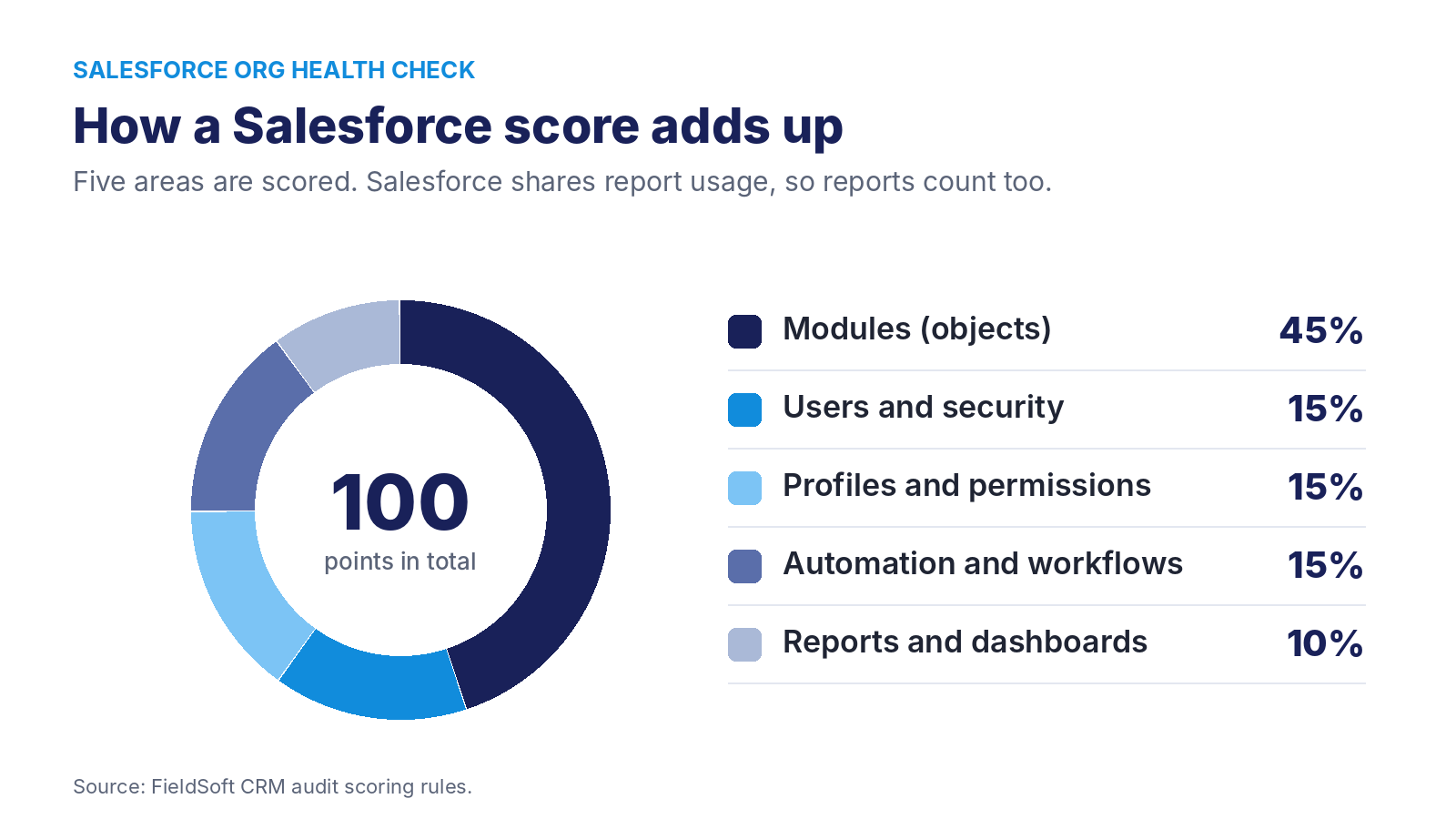
Salesforce shares when each report was last run and each dashboard last viewed. So unlike a Zoho CRM health check, a Salesforce score includes reports and dashboards.
On the other hand, some findings are shown but never scored. These are sales health (win rate, days to win, lead conversion), connections, templates, limits and Salesforce’s own Health Check score.
Idle Salesforce licences, priced in pounds
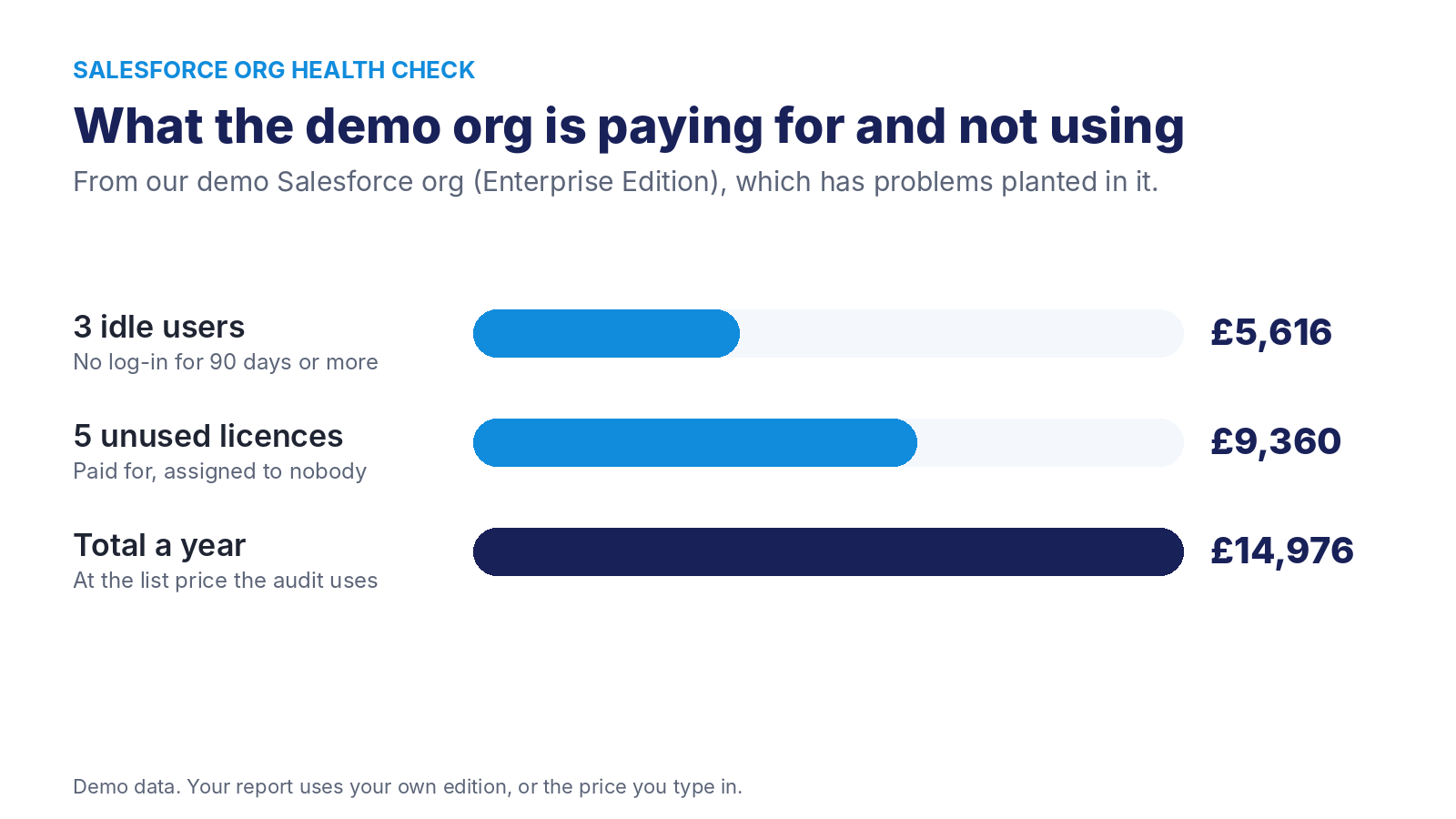
In addition, near the top of every report is a figure in pounds. Specifically, it adds up paid users who have not logged in for 90 days or more, and paid licences nobody is using.
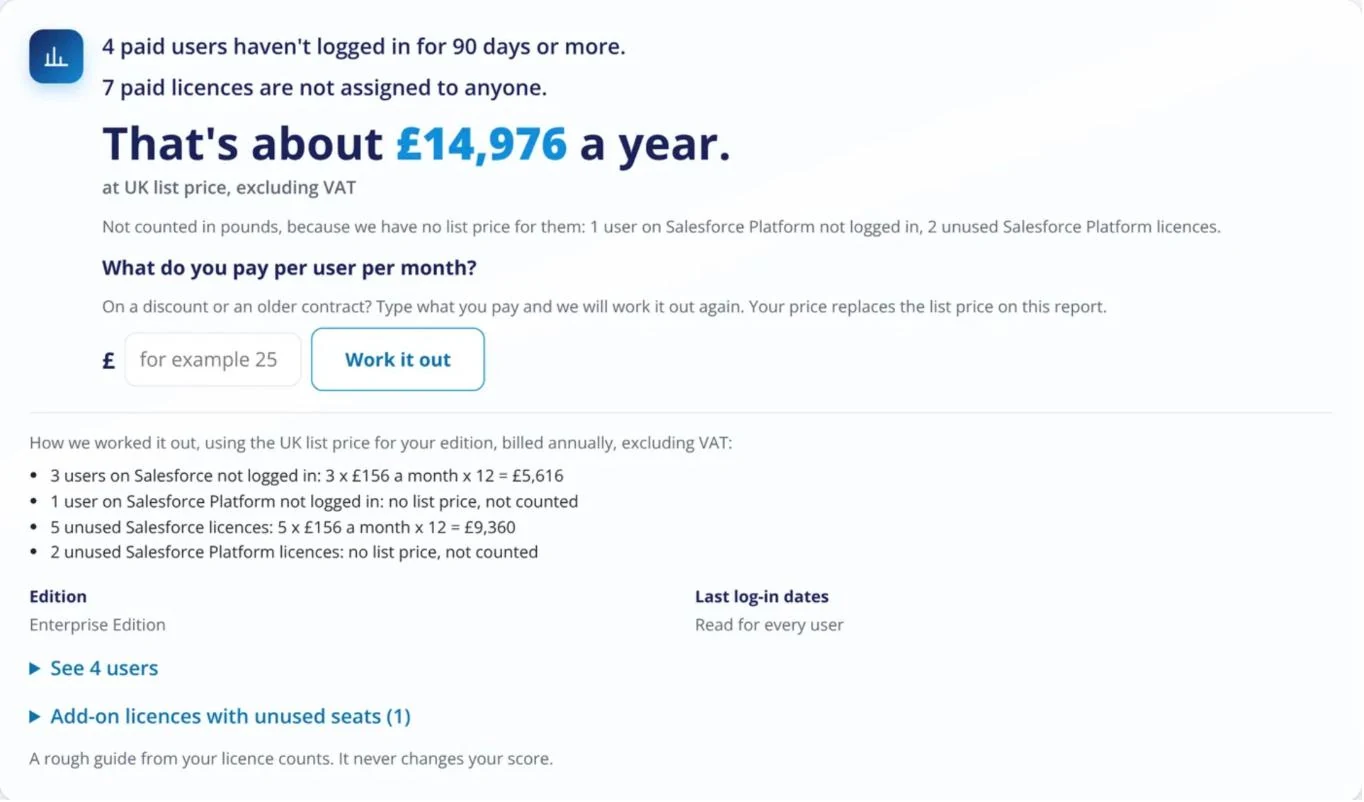
As a result, the working is always on the report. However, licences with no list price, like Salesforce Platform in the demo, are listed but not counted. Also, if you pay less than list price, type in your price and the report works it out again. The cost figure never changes your score.
If you are weighing up whether Salesforce is still the right fit, read our independent Zoho vs Salesforce comparison.
Connected apps and people who have left
To begin with, the audit lists everything plugged into your org: apps users have signed in to, connected apps, installed packages, named credentials and remote site settings.
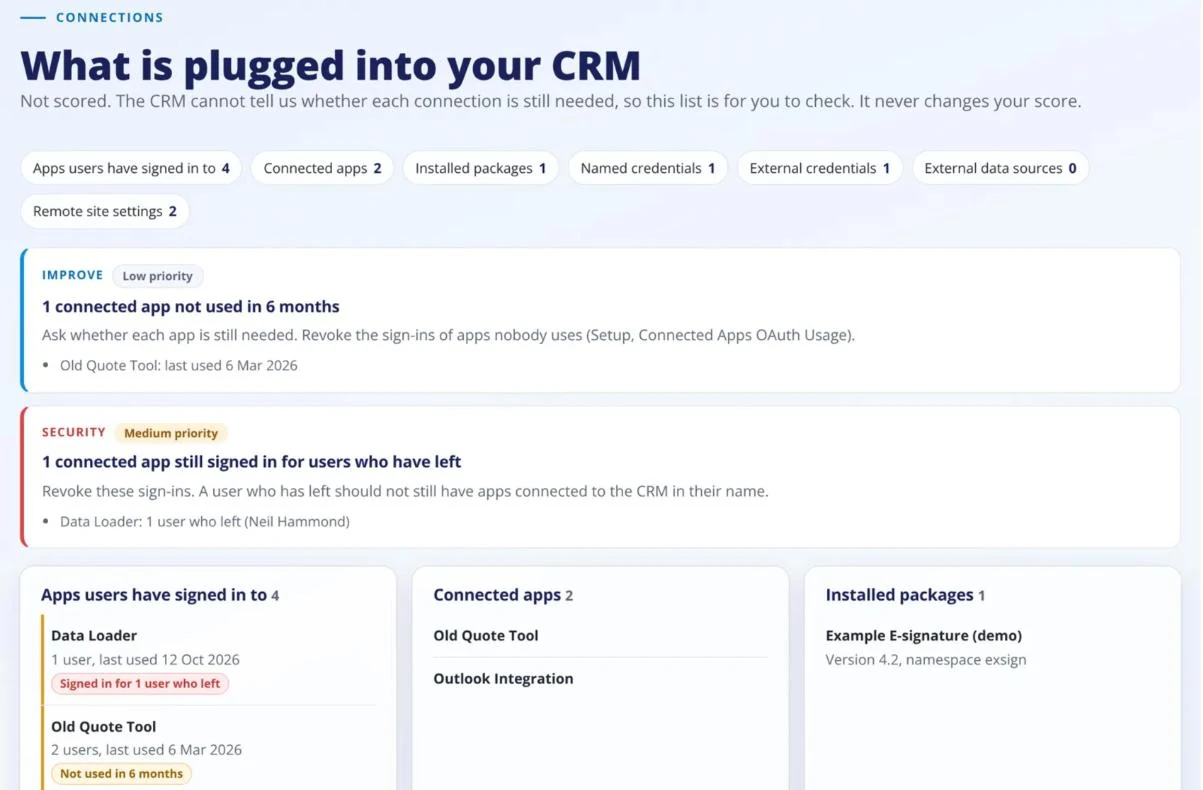
Two things get flagged. First, apps nobody has used in 6 months. Second, apps still signed in for people who have left, which the audit tags as Security. The connections list itself never changes your score, because only you know whether each app is still needed.
What Salesforce does not give us
When Salesforce does not share something, the report says so. We never guess a number. These are the gaps today:
- Which stages belong to each sales process, because Salesforce only gives this through its Metadata API
- When flows, Process Builder, workflow rules and Apex triggers last ran
- Archived tasks and events, because Salesforce archives activities older than a year
- Data and file storage, unless the person signing in has the Manage Users permission
Is a Salesforce org health check safe to run?
Yes. However, Salesforce has no read-only permission for apps. So the audit asks for API access (the api scope) and no other scope.
- The code only sends read requests: queries, field lists and Bulk API query jobs
- As a result, it never creates, edits or deletes anything in your org
- It never asks for a refresh token, so the sign-in cannot be used again later
- Finally, the token is cancelled when the audit ends
What you get at the end
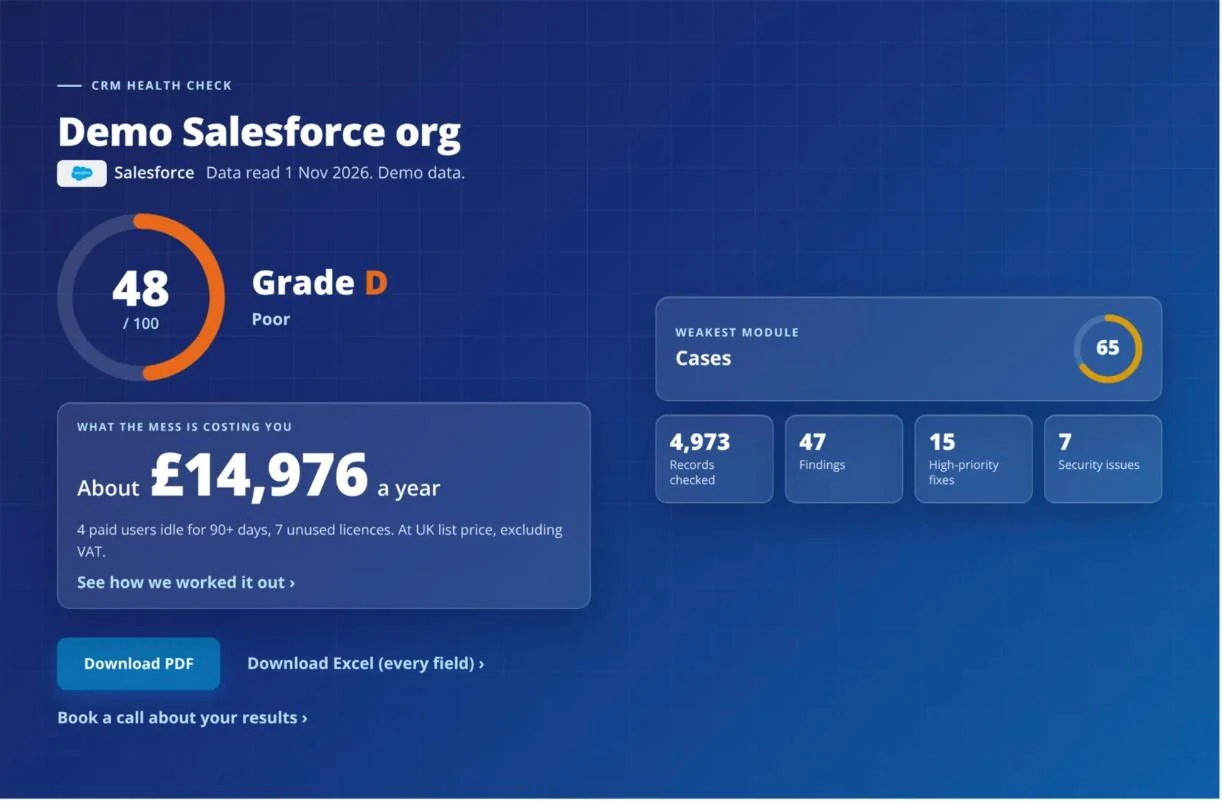
- A score out of 100, a grade and your weakest object
- What idle users and unused licences cost you a year
- Every finding with its tag, priority and fix
- A PDF to share, plus an Excel file with every field
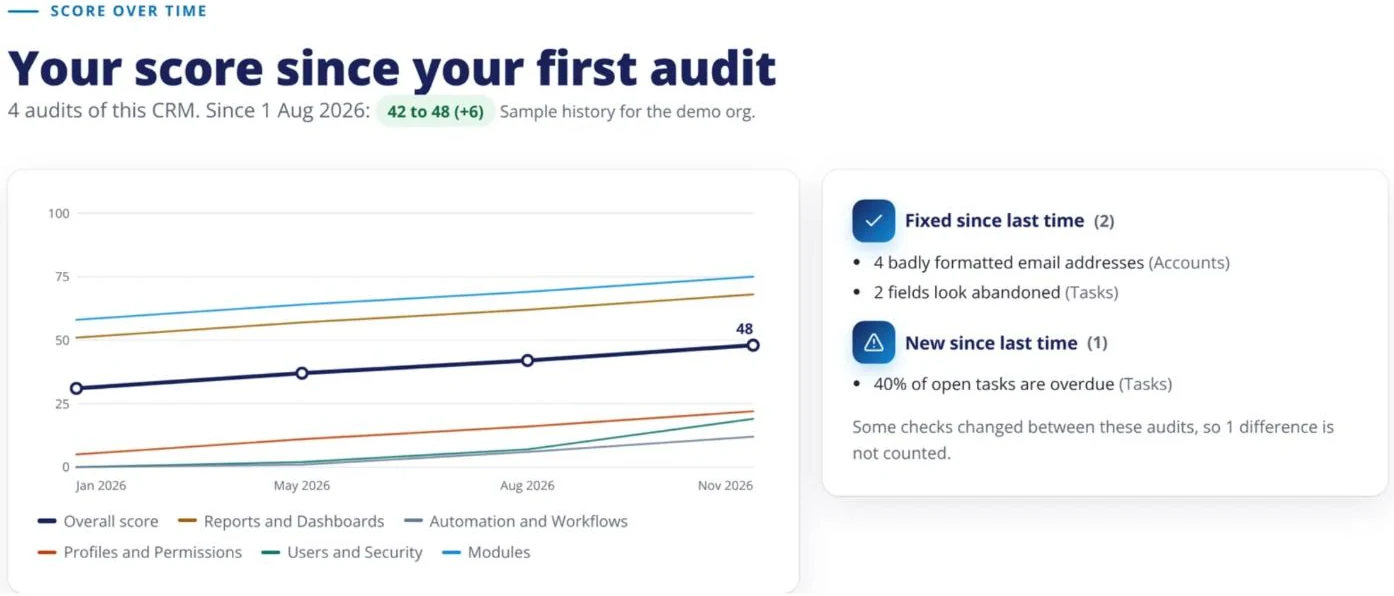
- A score history each time you run it again, with what you fixed and what is new
- An optional reminder to run it again every month or every 3 months
What to do after your Salesforce org health check
First, tackle the high-priority fixes. Some take ten minutes, like freezing users who have left. Others, like moving Process Builder to Flow or tightening permission sets, need someone who knows Salesforce well.
So we offer three ways to go further:
Audit app
Run it yourself at audit.FieldSoft.co.uk and get your report in minutes.
2-hour call
Go through your report with our team, or review a CRM the app does not cover.
On-site audit day
We document your processes and write an improvement plan for your team.
We are independent, certified CRM consultants and earn no reseller commission from Salesforce. As a result, nobody pays us to sell you more licences. If you want the fixes done for you, our Salesforce consultancy team can take them on. Or our CRM managed service keeps them fixed month after month. You can read more about all three options on our CRM health check page.
Run your free Salesforce org health check
Read-only, free and done in minutes. Works on production orgs and sandboxes.
Salesforce org health check FAQ
Most audits finish in a few minutes. Large orgs take longer, because the audit reads every record on every object in use.
Yes. Choose sandbox on the sign-in screen and the audit signs in at test.salesforce.com. Meanwhile, production orgs sign in at login.salesforce.com.
Salesforce has no read-only permission for apps, so api is the narrowest scope that lets the audit read your org. Also, the code only sends read requests and never asks for a refresh token.
No. It lists Apex triggers on the automation map, but it never reads the code inside them.
Salesforce Health Check scores your security settings. Our audit also checks data, licences, automations, reports and connected apps, and shows Salesforce’s own score alongside.
Yes. It is free to run, and there is also no obligation to buy anything afterwards.
Ready to see your score? Run the free Salesforce audit, or book a call with our team.
Want someone to look after your CRM?
Our managed service gives you a CRM consultant every month for fixes, changes and new builds. Response within 1 working day.
Silver £550/monthGold £900/monthPlatinum bespoke
Bradley founded FieldSoft in 2020 after years in software sales. He has used CRMs as a sales user, and now builds and supports Zoho, Salesforce and SugarAI systems for UK businesses.