
 By Bradley Field, founder of FieldSoft10 min read · Updated 19 November 2026
A Zoho CRM health check tells you how much of your CRM you can trust. Our free audit runs one for you in a few minutes. It reads every record, scores your CRM out of 100 and lists the fixes in priority order. Because it only reads, nothing in your Zoho CRM changes.
Below we walk through every check, with screenshots from our demo Zoho CRM org. We planted known problems in that org, so every name and number you see here is made up. To try it on your own CRM, go to audit.FieldSoft.co.uk.
In short: a Zoho CRM health check reviews your data, users, permissions, pipeline, fields and automations. Our free audit does it automatically. You sign in with a Zoho CRM administrator account, it reads everything, and you get a score out of 100, a grade for every module and a list of fixes. It also shows what unused licences cost you a year.
What is a Zoho CRM health check?
A Zoho CRM health check is a review of how your CRM is set up and how your team uses it. It covers your data, your users, your permissions and your automations. Then it tells you what to fix first.
You can do one by hand. For example, you could open each module, sort by modified date and count the empty fields. However, on a CRM with 50,000 records that takes days. So we built an audit that does the counting for you, across every module and every record.
Besides that, our team uses the same scan on site with clients. So the free version runs the same checks we use on paid work.
Zoho CRM health check vs the Zoho CRM audit log
People often mix these two up. Zoho’s audit log is a built-in record of who did what in your CRM, in date order. You find it in Setup, and Zoho explains it in its FAQs on audit logs.
A health check looks at the state of your CRM today. For example, how many leads have no email, which workflow rules are switched off and who can export your data. So use the audit log to trace a change, and use a health check to find what needs fixing.
What our Zoho CRM audit reads
First, you sign in with a Zoho CRM administrator account on Zoho’s own page. Then the audit reads:
- Users, profiles and the permissions on each profile
- Every module that holds records, standard and custom, plus every field in it
- Every record in every module in use. Modules with more than 2,000 records go through Zoho’s Bulk Read, which only reads
- Workflow rules, blueprints, assignment rules, cadences, scoring rules and scheduled functions
- Pipelines, webhooks and connected workflows, where Zoho lets the audit read them
- Who created and last changed each record (names and dates only, never the content)
- Your edition and how many user licences you have bought
Also, there is no record limit. We tested it on a made-up org with 150,000 leads and 160 fields, and it read every module.
It also works with 8 Zoho data centres: United States, Europe, India, Australia, Japan, Canada, Saudi Arabia and the United Kingdom. Zoho tells the audit where your account lives, so there is no data centre to pick.
What the Zoho CRM health check looks for
Above all, the checks focus on the problems that cost sales users time. Here is the full list.
| Check | What it flags |
|---|---|
| Duplicates | Leads, contacts and accounts that share a name, email or phone. A deal only counts when its name, account, amount and close date all match another deal. |
| Records you cannot use | Leads and contacts with no email, phone or mobile, and email addresses that will bounce. |
| Pipeline | Open deals with no update in 90 days, past their close date or with no amount. |
| Stages | Stages nobody uses in each pipeline, and deals sitting on stages that are switched off. |
| Fields | The fill rate of every field, when it was last seen in use and picklist values nobody uses. |
| Users and permissions | How many administrators you have, who can export data and which profiles can mass delete or mass update. |
| Who can see what | Modules where every user can open and change every record. Deals, Contacts and Accounts count most. |
| Key fields | Lead Source, Email or Phone, Amount, Closing Date, Stage and Account when they are often empty and your layouts do not make them required. |
| Automations | Rules switched off, rules with no conditions and two rules changing the same field at the same moment. |
| Licences | Paid licences nobody uses, and paid users with no record activity in 90 days. |
Next, every finding gets a tag. Security means a risk to your data. Fix means something is wrong and needs putting right. Improve means it works, but it could work better. Each finding also gets a priority, so you know where to start.
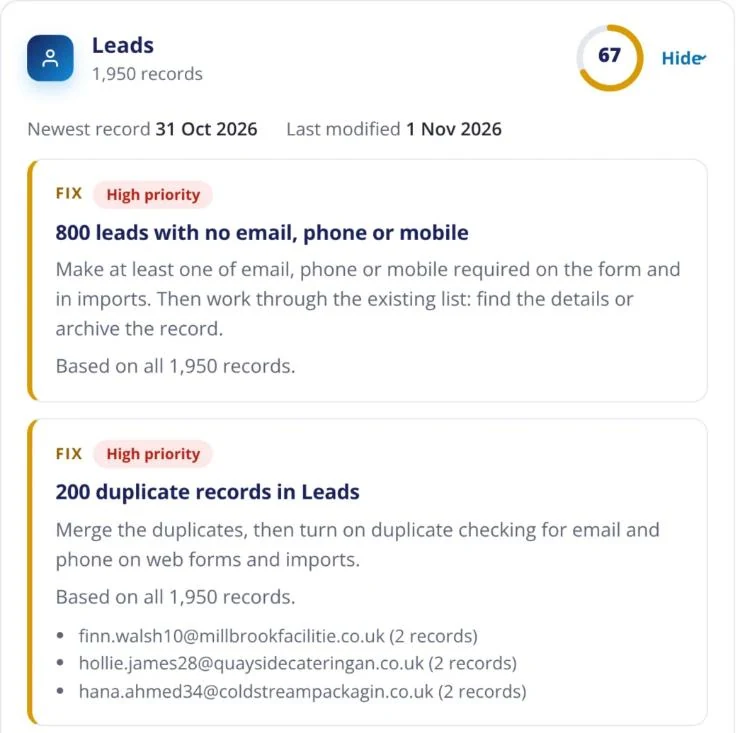
Fields last seen in use
Zoho does not store the date each field was last edited. So the audit shows the fill rate and the newest record that holds a value, and calls that “last seen in use”. Then it sorts every field into one of three groups:
- Custom: can be deleted once you have checked it is not used in workflows or reports
- System: can come off your layouts if you do not need it
- System critical: fields like Last Name, which Zoho needs. These are never flagged
For a deeper look at this one area, read our guide to a Zoho CRM field usage audit.
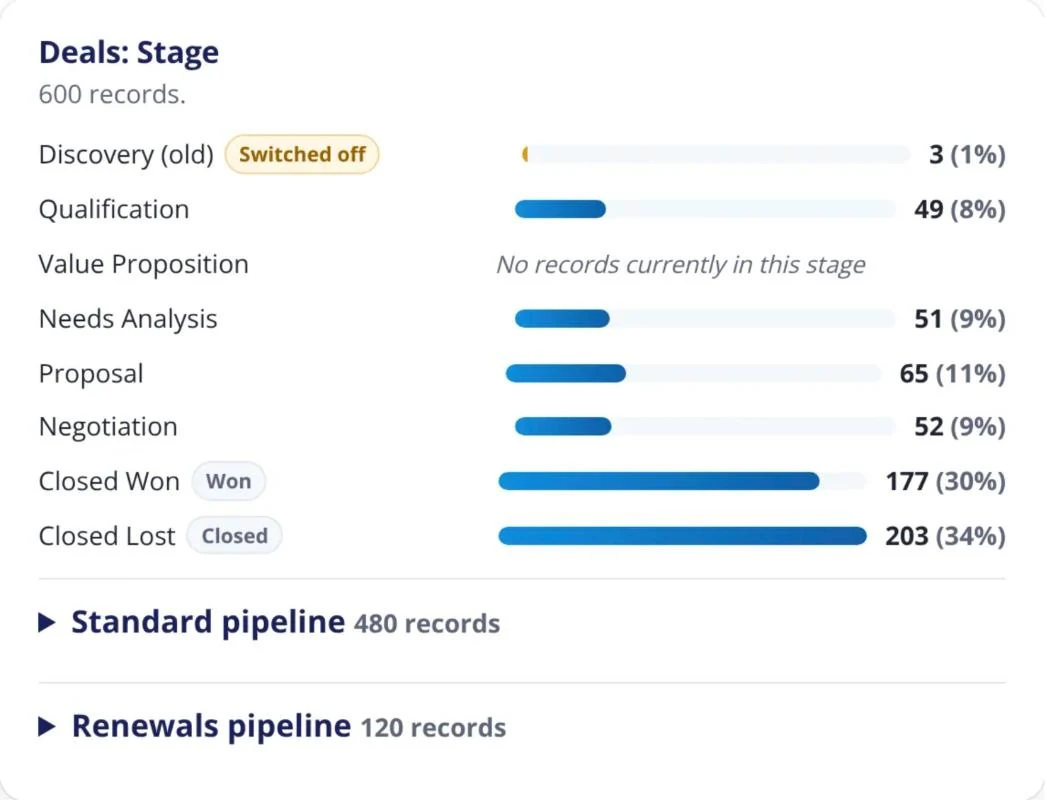
Stages and pipelines
The audit counts the records on every stage, in every pipeline. In the demo org below, an old stage is switched off but still holds 3 deals. Also, Value Proposition holds none at all, so it may not belong in the process.
How the Zoho CRM health check score works
Your CRM gets one score out of 100 and a letter grade. Also, each area gets its own score, and so does every module in use.
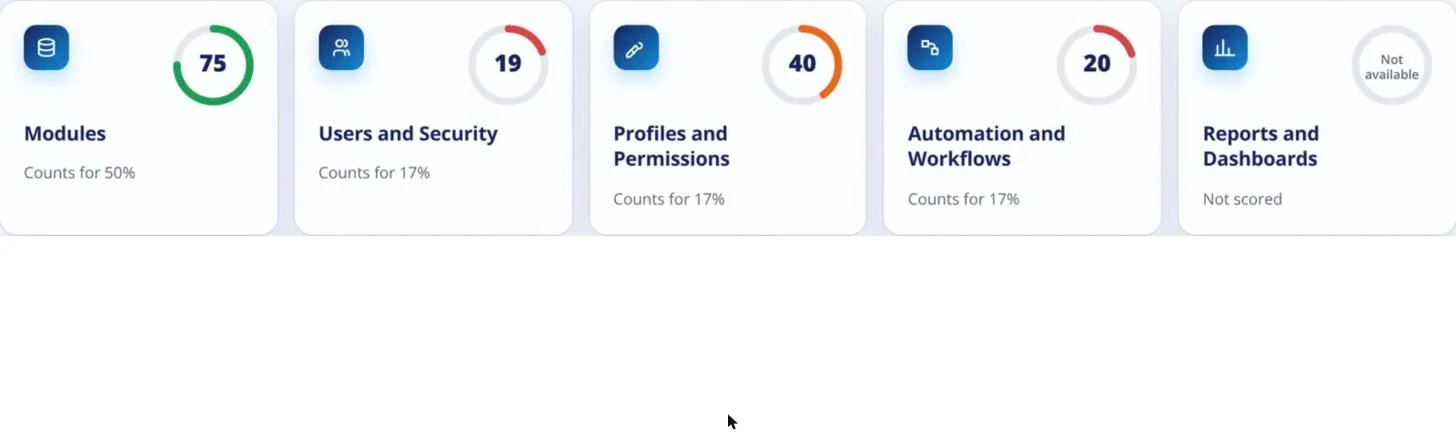
The areas are weighted. Modules count most, because that is where your data lives. Inside that area, bigger modules count for more. So a handful of messy records in a small module cannot sink your whole score.
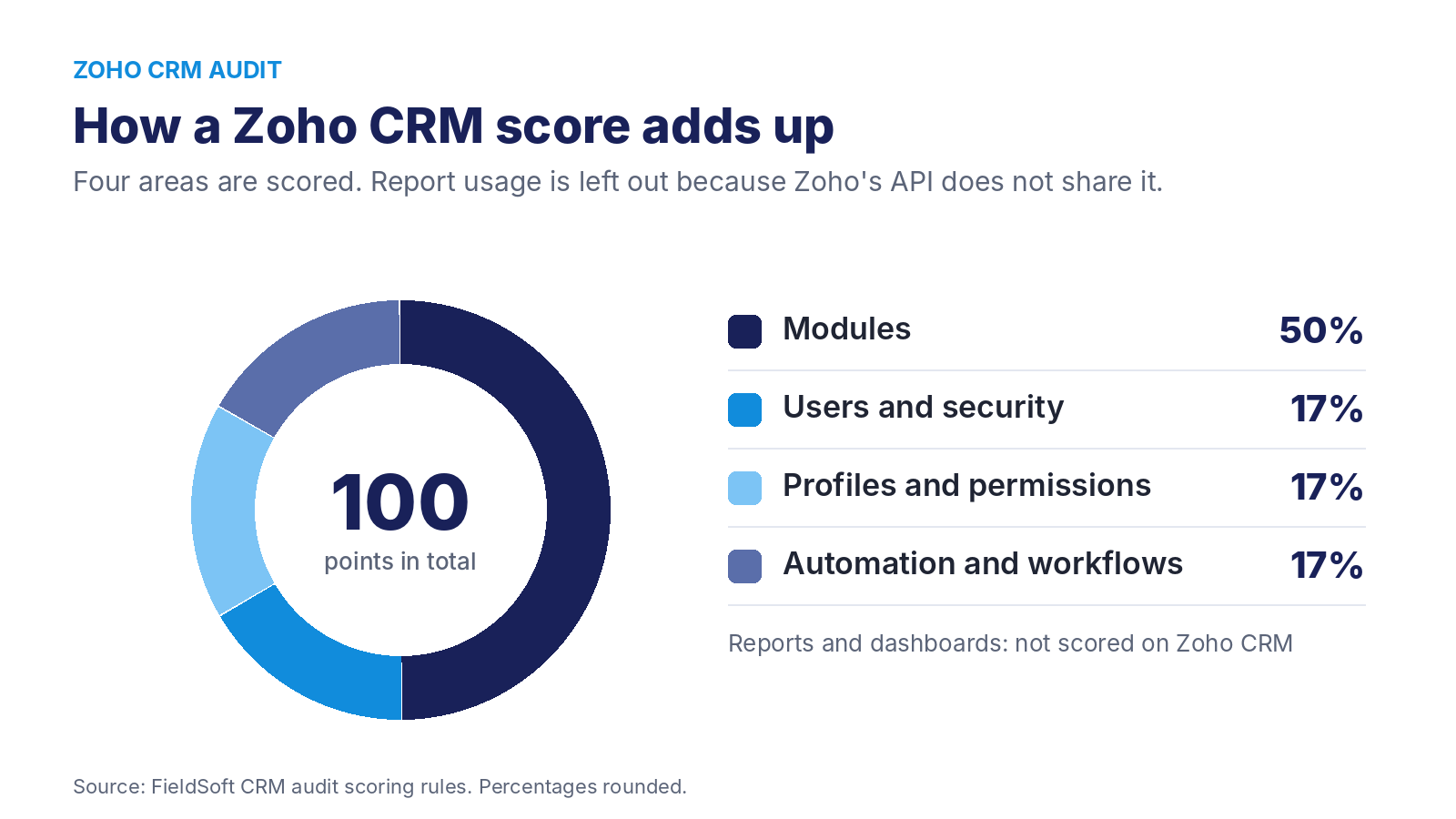
Zoho’s API does not say when each report was last run. So Reports and Dashboards is left out of a Zoho score, and the other four areas scale up to fill the gap. A Salesforce org health check does include reports, which is why the two scores weigh slightly differently.
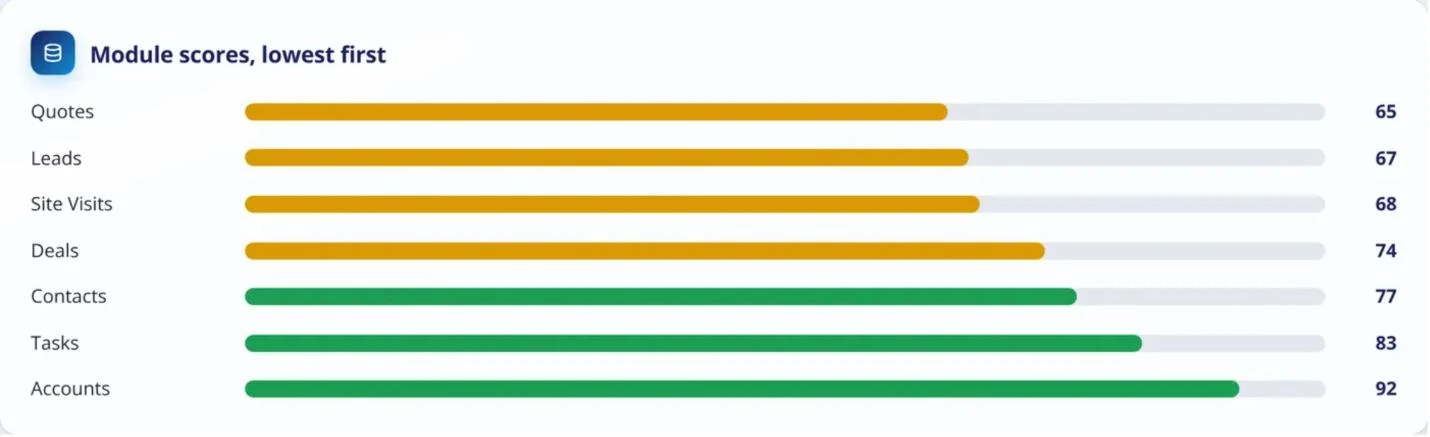
Meanwhile, modules with no records appear without a score, so an empty module cannot pull you down. Extension modules, such as Zoho Sign, and log modules are listed as not scored.
What a messy Zoho CRM costs you
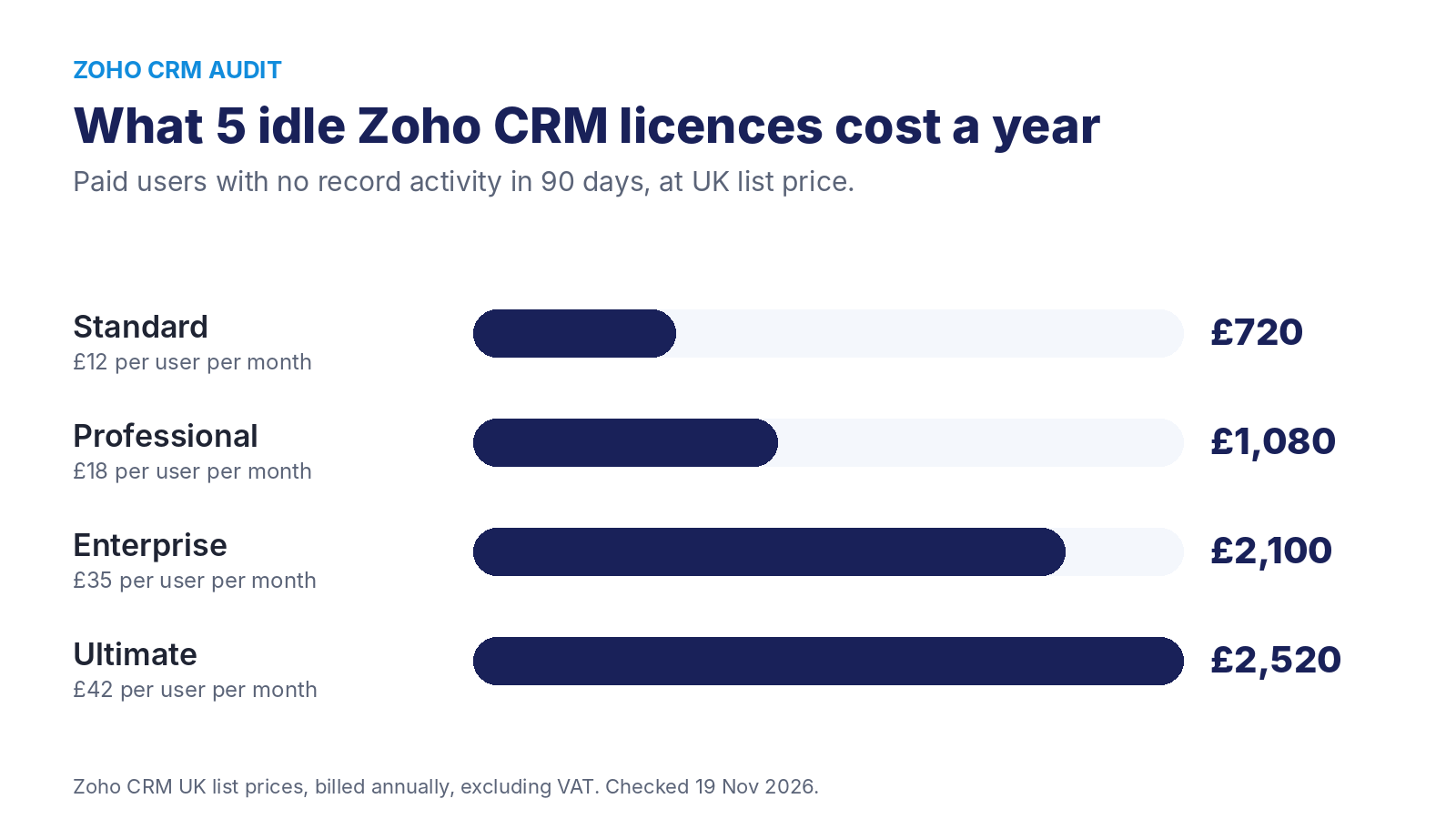
In addition, near the top of every report is a figure in pounds. It adds up paid licences nobody is using and paid users with no record activity in the last 90 days.
However, Zoho does not share log-in dates through its API. So for Zoho CRM, idle users come from record activity, and the report labels them that way.
The figure uses UK list prices, billed annually and excluding VAT. If you pay a different price, type it in and the report works it out again. For Zoho One and other bundles, the report always asks what you pay. Either way, the cost figure never changes your score.
The Zoho CRM automation map
The audit draws every automation under the module it runs on. That covers workflow rules, blueprints, assignment rules, cadences, scoring rules and scheduled functions. Then click any one to see what starts it, its conditions, what it changes and when it last ran.
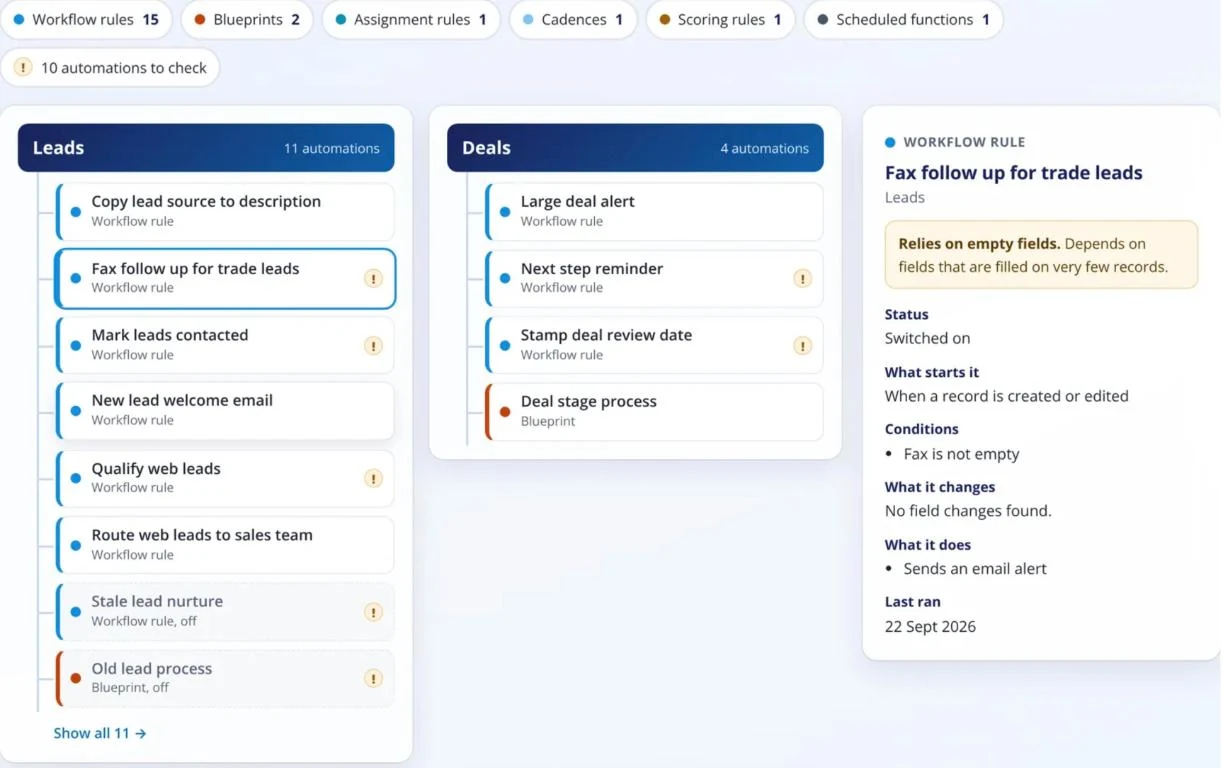
It flags five kinds of problem:
- Rules switched off but still there
- Two rules changing the same field at the same moment
- Rules with no conditions, which run on every record
- Rules not run in 12 months
- Rules that rely on fields which are mostly empty
However, Zoho only shares a last-run date for workflow rules. So other kinds show “Not given by the CRM” for that date.
What Zoho’s API does not give us
When Zoho does not share something, the report says so and leaves it out of your score. We never guess a number. These are the gaps today:
- Last log-in dates, so idle users come from record activity
- When each report was last run, so reports are not scored
- Approval processes, and the connections used by functions
- Validation rules, and how long each deal has sat in its current stage
- How much storage you use, and how much of most feature limits
Is a Zoho CRM health check safe to run?
Yes. The audit asks Zoho for six permissions, and each one only reads:
ZohoCRM.modules.READZohoCRM.settings.READZohoCRM.users.READZohoCRM.org.READZohoCRM.coql.READZohoCRM.bulk.READIn other words, it never asks for permission to create, change or delete anything. Also, the sign-in token stays in server memory and is never saved. When the audit ends, we ask Zoho to cancel it.
Some audit tools ask Zoho for full create, read, update and delete access. So read the Zoho consent screen on any tool before you click approve.
What you get at the end
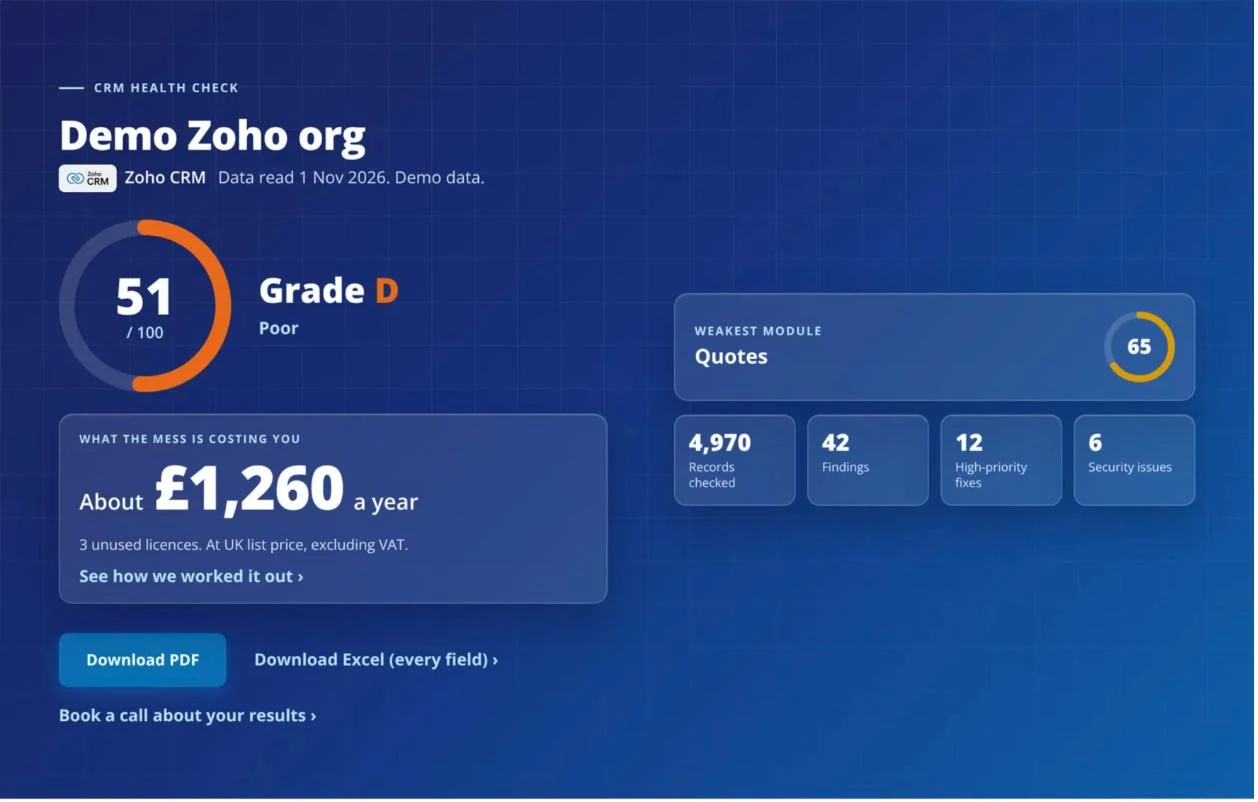
- A score out of 100, a grade and your weakest module
- What unused licences cost you a year
- Every finding with its tag, priority and fix
- A PDF to share, plus an Excel file with every field
- A score history each time you run it again, with what you fixed and what is new
- An optional reminder to run it again every month or every 3 months
What to do after your Zoho CRM health check
First, tackle the high-priority fixes. Some take ten minutes, like deactivating users who have left. Others, like merging duplicates or tightening profiles, need someone who knows Zoho well.
So we offer three ways to go further:
Audit app
Run it yourself at audit.FieldSoft.co.uk and get your report in minutes.
2-hour call
Go through your report with our team, or review a CRM the app does not cover.
On-site audit day
We document your processes and write an improvement plan for your team.
We are independent CRM consultants and earn no reseller commission from Zoho. As a result, nobody pays us to push a licence upgrade. If you want the fixes done for you, our Zoho CRM consultancy team can take them on. Or our CRM managed service keeps them fixed month after month. You can read more about all three options on our CRM health check page.
Run your free Zoho CRM health check
Read-only, free and done in minutes. See your score, your grade and your top fixes.
Zoho CRM health check FAQ
Most audits finish in a few minutes. Large CRMs take longer, because the audit reads every record in every module in use.
You need to sign in with a Zoho CRM administrator account. The audit checks this before it starts.
Yes. Zoho CRM inside Zoho One is audited the same way. The report asks what you pay per user, because a Zoho One licence covers more than CRM.
United States, Europe, India, Australia, Japan, Canada, Saudi Arabia and the United Kingdom. Zoho tells the audit which one you use when you sign in.
Yes. It is free to run and there is no obligation to buy anything afterwards.
No. It only holds read permissions, so it cannot create, change or delete a record.
Ready to see your score? Run the free Zoho CRM audit, or book a call with our team.
Want someone to look after your CRM?
Our managed service gives you a CRM consultant every month for fixes, changes and new builds. Response within 1 working day.
Silver £550/monthGold £900/monthPlatinum bespoke
Bradley founded FieldSoft in 2020 after years in software sales. He has used CRMs as a sales user, and now builds and supports Zoho, Salesforce and SugarAI systems for UK businesses.