
 By Bradley Field, founder of FieldSoft10 min read · Updated 31 October 2026
Zoho CRM quotes get slow when you sell thousands of products across five price bands, with discounts that change by customer. That was the position one UK based manufacturer was in when they asked us to rebuild their CRM.
They had run Zoho CRM since 2014. It had 20 users, and nobody had ever configured it. So the quotes module sat unused, and the team built every quote in Excel. Each one took around 20 minutes. Now a sales user builds and sends a quote in about 2 minutes.
Below, we cover what the tool does and exactly how we built each part in Zoho. If your sales team quotes complex products and dreads the standard Zoho quote screen, this one is for you.
Where Zoho CRM quotes fall down out of the box
The standard quotes module in Zoho CRM has barely changed in years. First you add a row, then search for a product, type a quantity and repeat. With a big catalogue, your sales users have to:
- Remember product codes, or scroll through hundreds of products to find the right one
- Remember which optional extras go with which product
- Pick the right price book for the customer, every time
- Work out discounts by hand and hope they match the price list
Zoho users ask for the same fix on Zoho’s own forums, for example in this Zoho CRM Quotes module needs upgrades thread.
Before: 20 minutes per quote in Excel
Before the rebuild, this manufacturer quoted from a spreadsheet. Because it was all manual, each quote took around 20 minutes to build. Then someone saved it as a PDF and emailed it by hand. That process caused problems every week.
Excel and email
- About 20 minutes per quote
- Prices typed in by hand, so wrong prices went out
- No record of which quote went to which customer, or when
- Quotes only reached Zoho if someone remembered to upload them
- One extra item meant rebuilding the quote from scratch
Zoho CRM quotes
- About 2 minutes per quote
- Prices and discounts pulled from the price book and rules
- Every quote lives on its deal, with its status
- Sent for e-signature and tracked in the CRM
- Edit a line and the whole quote reprices
What we built
The quote tool lives inside the standard Zoho CRM Quotes module. First, we loaded the full price structure from their old accounts system in a one off import: 6,770 products, 18 price books (one for each customer discount group) and 447 discount rules.
The discount rules sit in their own custom module. Each rule links a price book to a product group and a discount percentage.
Then we built the quote process around that data. Now the sales team no longer has to:
- Look up prices, discounts or VAT
- Remember which extras go with which product
- Chase the commercial director for discount approval
- Email PDFs and wait to hear if they were signed
- Type up a sales order after the customer signs
- Chase deposits by hand
- Remember to close quotes that have expired
Every quote prices itself
Each customer record holds a price band. So when a sales user starts a quote, the tool already knows how to price it.
- The price book sets the price band and the customer’s discount group.
- Then the discount comes from the Discount Rules module, matched on price book and product group.
- There are five price bands in three currencies: sterling, euro and US dollar. Zoho’s multi-currency setting handles the conversion, and the function picks the currency from the band.
- VAT at 20% applies when the customer is on the standard UK band with a UK address. Export and trade quotes go out without VAT.
We switched off Zoho’s setting that adds product taxes automatically. As a result, the function decides when VAT applies.
Pricing happens in two places. First, a Client Script prices each line on screen as the sales user adds it. Then, on save, a workflow runs a Deluge function that checks the whole quote. It reprices any line with no discount from the rules and recalculates the discount figures. If the quote has no price band yet, it reprices every line.
Building a quote: pick the product and the extras follow
A Client Script adds an Add Product button to the top of the quote screen. Once clicked, it opens a product builder widget. The sales user picks a product range, a quantity and any extras.
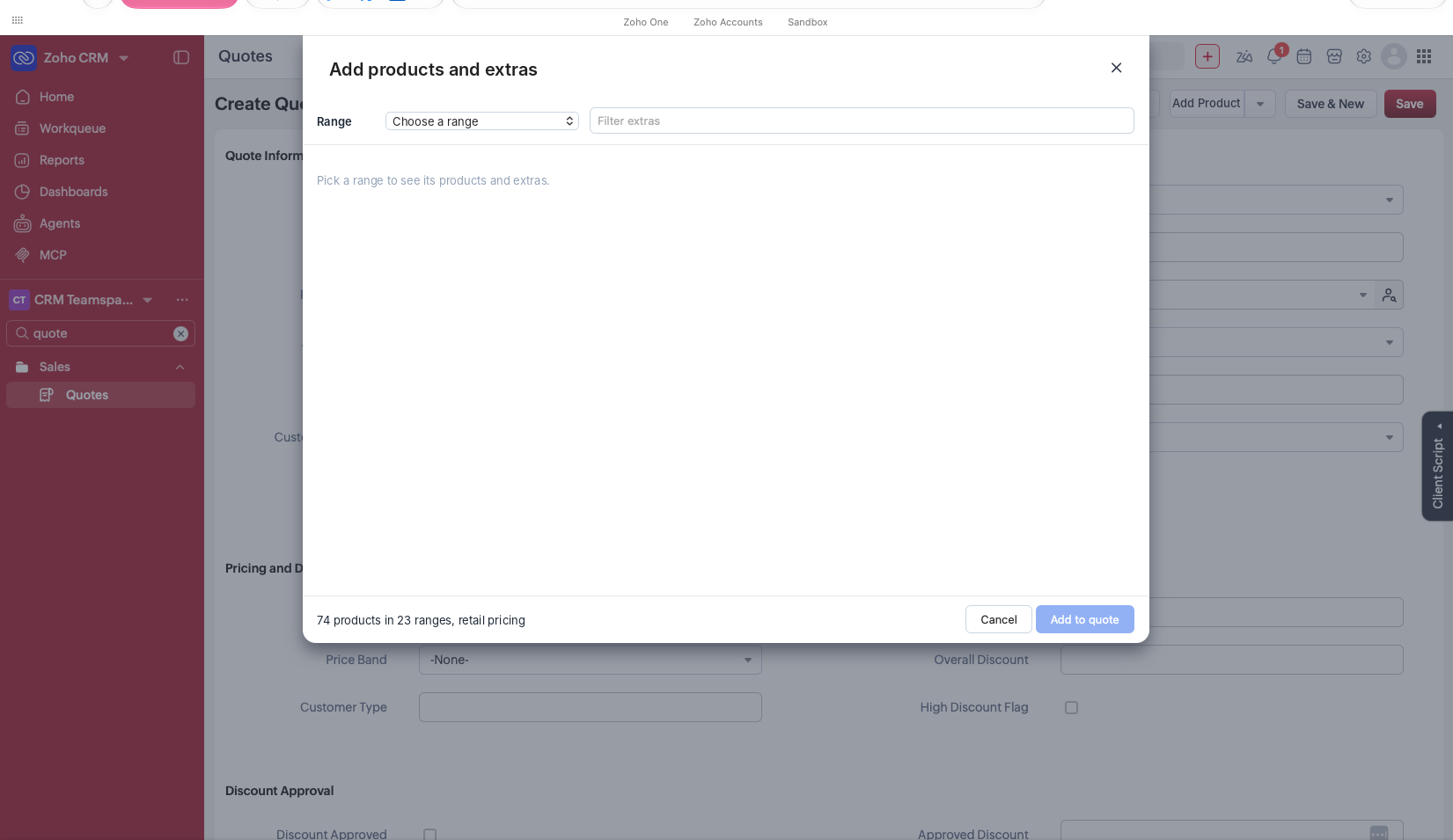
Each product record holds a list of recommended add ons. The widget reads that list, so the right extras come ticked by default, already priced in the customer’s band.
When a sales user adds a complete product with a standard pack, a Client Script asks if they want the pack too. One click adds every item.
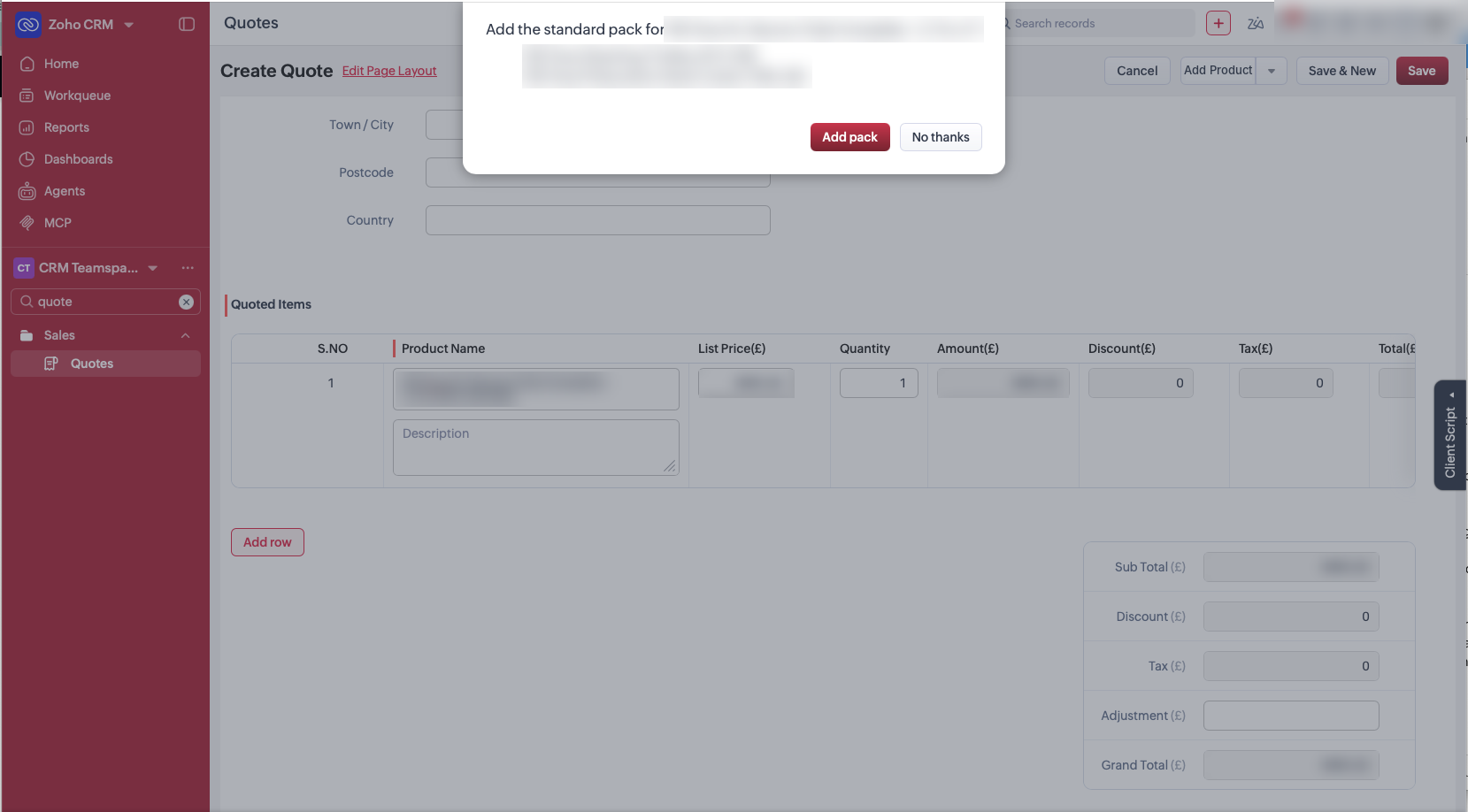
Prices also show live as each line goes in. So if the sales user changes the price book, another Client Script reprices the whole quote.
A few smaller details also save time:
- Each quote takes its reference number from its deal’s auto number, with a suffix for each version (-1, -2 and so on). The function renumbers cloned quotes and fixes duplicates.
- A Client Script sets Valid Till to 30 days when the quote opens. The function fills it on save if it is still blank.
- The deposit defaults to 10% of the total including VAT. However, a Deposit Override field lets the sales user change it.
Discount control without chasing anyone
On every save, the function writes two fields: the biggest single line discount and the overall discount percentage.
If any line goes over 30%, the function sets a High Discount flag. The function then holds the quote at Awaiting Approval, and nobody can send it. Meanwhile, the commercial director gets a high priority task.
The Discount Approved tick box is read only for standard users, using Zoho’s field permissions. So only the commercial director can tick it. When he does, the function stamps the approved discount, closes the approval tasks and gives the quote owner a task to send it.
Also, the approval only covers that discount. If a sales user raises any line above the approved figure afterwards, the approval clears and the function holds the quote again.
Getting Zoho CRM quotes signed with Zoho Sign
We built this in a sandbox first, where the standard Zoho Sign extension was not available. So we connected to the Zoho Sign API directly from Deluge.
When the sales user sets the quote to Quote Sent, a workflow runs the send function. It creates a branded PDF from a CRM quote template, uploads it to Zoho Sign and sends it for e-signature. The function also places the signature box in code, because Zoho Sign did not pick up the signature tag through the API.
Before sending, the function checks the quote is ready. For example, it blocks the send if there is no contact, no email address, no products, the Valid Till date has passed, or a discount still needs approval. Then it moves the quote back to Draft, adds a note and gives the sales user a high priority task explaining why.
After that, the CRM tracks the signature. Zoho Sign calls a webhook, which runs a CRM function through the REST API. The function takes only the request ID from the webhook, then reads the real status back from Zoho Sign. A scheduled sync also runs in case a webhook is missed.
Finally, while the quote is waiting for a signature, the sales user gets chase tasks at 3, 7 and 14 days.
When the customer signs
The tool handles the admin from here, in this order:
- Quote confirmedThe function attaches the signed PDF, marks the quote Confirmed and stamps the accepted date.
- Sales order createdNext, the function creates a sales order with the same lines, prices and VAT.
- Deal tidied upThe function marks any other quotes on the same deal lost and closes their tasks. The deal moves to Quote Accepted, Awaiting Deposit.
- Deposit requestedA PayPal invoice for the deposit goes to the customer automatically. The function skips trade accounts.
- Deposit chasedA daily schedule sends reminders at day 3 and day 7. On day 7 the sales user also gets a task to phone the customer.
- Payment recordedOnce the customer pays, a workflow emails the order file to the quote owner and the accounts team.
The function calls the PayPal API directly from Deluge, with no Zoho Flow in between. When the customer pays, PayPal calls a webhook into the CRM. Once again, the function reads the invoice back from PayPal before it records anything. An hourly sweep also catches any payment the webhook missed.
What happens when a quote expires
Two schedules close expired quotes on their own.
- First, at 07:45 the day before expiry, the sales user gets a warning.
- At 23:45 on the expiry day, the schedule withdraws any signature request still out and cancels any unpaid PayPal invoice.
- After that, the schedule marks the quote lost. If it was the only quote on the deal, it marks the deal lost too.
- The sales user gets a task to reissue it if the customer still wants to buy.
However, customers who have signed always get at least 7 days to pay. If their Valid Till date is too close, the function pushes it out.
If Zoho Sign or PayPal refuse a request, nothing closes. Instead, the quote stays open, the sales user gets a high priority task, and the schedule tries again the next night.
Keeping Zoho CRM quotes and deals in step
First, quote stages and deal stages sync both ways. The save function moves the deal forward as a quote is sent, signed, won or lost. A separate workflow and function update every quote when someone moves a deal to won or lost.
Meanwhile, the deal value always comes from the accepted quote, or the latest one, excluding VAT. So the pipeline report shows real numbers.
How each part is built
| What it does | Built with |
|---|---|
| Live line pricing on screen | Client Script |
| Product builder and recommended extras | Client Script button and a widget |
| Standard pack prompt | Client Script |
| Repricing and checks on save | Workflow rule and Deluge function |
| Discount rules | Custom module, imported once |
| Currencies and VAT | Deluge function, Zoho multi-currency, product tax |
| Discount approval | Deluge function and field permissions |
| CRM quote template | |
| Sending for signature | Workflow rule, Deluge function, Zoho Sign API |
| Signature status | Zoho Sign webhook, CRM REST API function, scheduled sync |
| Sales order on signature | Deluge function |
| Deposit invoice and payment | Deluge function, PayPal API and webhook, schedules |
| Expiry | Two daily schedules |
| Quote and deal stage sync | Deluge functions and a workflow rule |
Could your Zoho CRM quotes work like this?
Each build like this is tailored to the business. Your price rules, approval limits and payment steps will differ from this manufacturer’s. So we design each one around how your team sells.
So it suits you if:
- You quote complex products with options, extras or bundles
- You have more than one price list, currency or discount structure
- You still build quotes in Excel or Word
- You use Zoho but your team avoids the standard quote screen
This quote tool was one part of a full Zoho CRM rebuild that took three months. If you want to know what a rebuild might cost, our guide to Zoho CRM pricing in the UK covers licences and the costs around them. If you are still choosing a platform, read our Zoho vs Salesforce vs SugarCRM comparison.
Still building quotes in a spreadsheet?
Book a call with our Zoho team. We will show you what your quotes could look like in Zoho CRM.
Zoho CRM quotes FAQs
Yes. The usual route is the Zoho Sign extension for Zoho CRM. In this build we used the Zoho Sign API from Deluge, so setting a quote to Quote Sent sends it automatically.
Yes. In this build any line discount over 30% holds the quote at Awaiting Approval until the commercial director ticks it off. However, the limit can be set to whatever suits your business.
Yes. Here a Deluge function creates the sales order as soon as the customer signs, with the same lines, prices and VAT.
Yes, with some build work. In this case Deluge calls the PayPal API to raise the deposit invoice, and a PayPal webhook tells the CRM when it is paid.
It depends on your products and pricing. We built this quote tool as part of a three month CRM rebuild for a 20 user team. Book a call with us and we can give you a realistic estimate for yours.
If your team still builds quotes in a spreadsheet, talk to our Zoho CRM consultants. We will show you what your quotes could look like in Zoho.
Want someone to look after your CRM?
Our managed service gives you a CRM consultant every month for fixes, changes and new builds. Response within 1 working day.
Silver £550/monthGold £900/monthPlatinum bespoke
Bradley founded FieldSoft in 2020 after years in software sales. He has used CRMs as a sales user, and now builds and supports Zoho, Salesforce and SugarAI systems for UK businesses.