
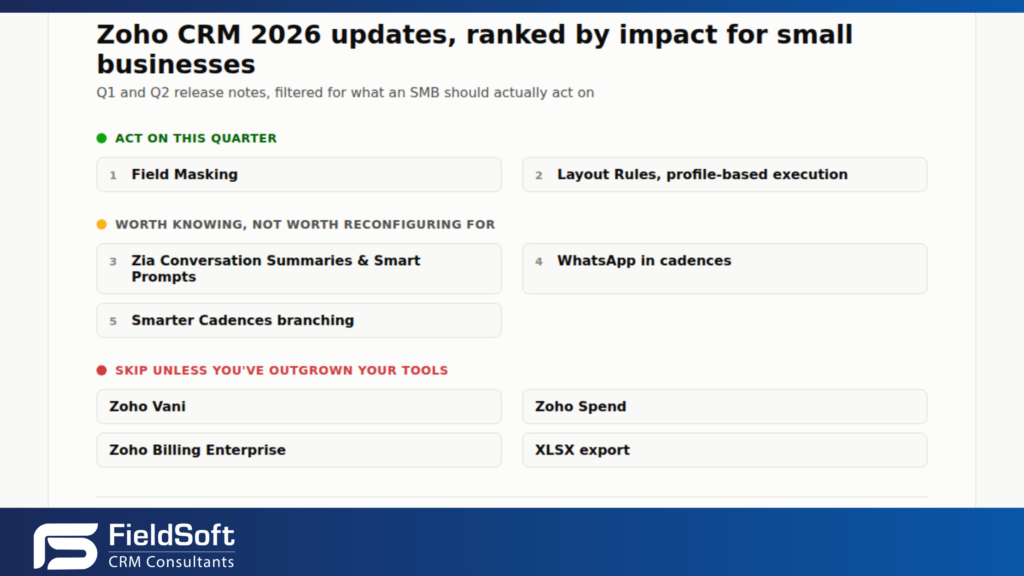
Zoho pushed dozens of changes through the Q1 and Q2 2026 release notes. Most small businesses running Zoho CRM don’t have a spare afternoon to read them. This is a filtered read of the Zoho CRM 2026 updates that change how you actually work, ranked by impact, not by release date. We’re also telling you what to skip, because a chunk of every Zoho CRM Q1 Q2 2026 release notes post is marketing padding dressed up as news.
If you’d rather have someone map this against your own setup, that’s exactly the filter FieldSoft runs for clients through our Zoho CRM consultancy and implementation work.
Zoho CRM Field Masking, what it does
Say a sales rep pulls up a customer record to check an order. They don’t need the full card number on file, or the date of birth stored for identity checks. Until this release, they saw the whole field or none of it. Field Masking gives admins two options: full masking, which hides the value completely, or custom masking, which shows a slice, such as the last four digits of a phone number. An authorised user clicks an eye icon to reveal the full value when needed, and that action is logged.
The masking holds across exports, reports, templates, integrations, API responses, and shared views. A masked field that only hides in the main record view and leaks out through a CSV export isn’t a security feature, it’s theatre.
It’s not finished everywhere yet. Zoho hasn’t rolled masking into certain email views, signal notifications, Zia features, or the mobile app, so don’t treat it as a complete data control until those gaps close. At the time of writing it’s rolling out to partners first, with customer access following. If you handle card details, ID numbers, or health data anywhere in your CRM, put this on your list now, not when it lands.
Zoho CRM Layout Rules profile-based execution, what changed
Layout Rules got nine new actions: show or hide picklist values, set fields read-only, auto-set field values, recommend field values, show contextual messages, show or hide related lists, show or hide buttons, show or hide links, and verify fields. Useful on their own, but not the headline.
The headline is profile-based execution. The same record can now behave differently depending on who’s looking at it. A sales rep opens a deal and sees a simplified layout with the fields they need to fill in. A finance user opens the same record and sees pricing and margin fields the rep never had access to. Before this, getting that behaviour meant custom scripting, duplicate layouts, or accepting that everyone sees everything.
Zoho added an Interactive Preview so admins can test a rule against different profiles before switching it on, rather than finding out it broke someone’s view after go-live. If your team has more than two or three roles working the same modules, this is the update worth booking time for.
Zia Conversation Summaries and Smart Prompts, is Zoho’s AI doing the work yet
Zia now summarises a customer conversation so a rep can catch up without scrolling through the full history. Smart Prompts extend into email composition and formula building, where you describe what you want in plain language and get a formula back to check rather than write from scratch. Zoho also opened up LLM choice, so you can run Gemini, Claude, or Cohere behind these features instead of Zia’s native model.
Here’s the honest part. This is decent autosummarising and decent suggestion tooling. It reads, it drafts, it proposes, and a person still checks and sends before anything goes out. If you’re expecting Zia to chase a lead or update a record on its own, that’s not what shipped this quarter. Zoho is edging toward agentic AI in the CRM. It hasn’t arrived yet. Use it, but don’t tell your team it replaces anyone’s job.
WhatsApp in Zoho CRM cadences, why UK SMBs should use it
Zoho added WhatsApp as a channel inside cadence sequences, alongside email and calls. Most write-ups mention it in a single line and move on. It deserves more than that for a UK audience.
Email open rates for cold or lukewarm B2B outreach sit low, often under 20%. WhatsApp messages get opened far more often, usually within minutes, because people check WhatsApp like a text, not a cluttered inbox. For trades, home services, and any business where the customer is on their phone rather than at a desk, that gap is the difference between a follow-up that gets seen and one that sits unread. Add a WhatsApp step into your cadence after the second unanswered email. Corporate procurement teams won’t message suppliers on WhatsApp, but consumer-facing SMBs are underusing it.
Zoho CRM Smarter Cadences, branching on call outcomes and email signals
Paired with WhatsApp, this is the other follow-up automation update worth knowing. Cadence steps can now branch based on call outcome and call duration, and on email signals: not opened, not replied, not clicked, and opened but not replied. Instead of one fixed sequence for every lead, the next step adjusts to what the lead actually did.
Combine this with the WhatsApp channel and you get a cadence that emails first, checks whether it was opened, and switches to WhatsApp if it wasn’t. That’s a rebuild worth doing if your current cadences are still one-size-fits-all.
What to skip in the Zoho CRM 2026 updates
Zoho Vani. A flowchart and infinite canvas tool, positioned against Miro and Lucidchart. Fine if you’re already shopping for a diagramming tool. Not a CRM feature and not a reason to open your admin panel.
Zoho Spend. A procurement platform for managing purchasing. Only relevant if you’ve outgrown your current purchase process, which most small teams haven’t.
Zoho Billing Enterprise. An upgraded tier of Zoho Billing (formerly Subscriptions). Matters only if you’re already on Zoho Billing and hitting its ceiling. If you’re not, this changes nothing for you.
XLSX export. A convenience fix, not a feature. Nice that it’s finally there. Not worth a line in your rollout plan.
Verdict
This is a quarter worth sitting down for, but only for two things. Field Masking if you hold any sensitive customer data, and Layout Rules if more than one type of user works the same records. Book an hour, test both in a sandbox, and roll out what applies. That’s the whole read on the Zoho CRM 2026 updates worth your time this quarter.
Everything else, including the AI updates, is worth knowing about and not worth reconfiguring anything for. Read the six updates above, ignore the rest of the release notes, and get back to running your business.
Need a hand working out what applies to you
Field Masking and Layout Rules are worth setting up properly, not bolted on and hoped for. If you want a second pair of eyes on either, get in touch with FieldSoft. We work with Zoho CRM daily and we’ll tell you straight whether it’s worth your time this quarter.